


Are you a PC gamer looking for the best mouse for gaming that’s comfortable, customizable and precise? No matter what kind of games you play, your mouse will have a large impact on your overall gaming experience.
In this guide, we’ll look at what you need to consider before buying a high-quality gaming mouse. Whether you want a dedicated sniping button or if you’re looking for a button grid for all those spell rotations, we’ll take a look at all the contenders for the best gaming mouse options for 2018.
Top Picks











Last update on 2026-07-07 // The links above are affiliate // Images from Amazon
What to Consider When Choosing The Best Gaming Mouse
There are many things to consider when choosing the right gaming mouse for your needs and personal preference. What features are you looking for? What looks good? What kind of games do you play? How do you hold the mouse when you’re playing? While there’s plenty to think about, most of it will come down to personal preference. The rest will be what fits into your budget and what’s available.
Know Your Grip Style
When it comes to gaming with a mouse, there are three main grips that people usually refer to when discussing the way a person naturally grips their mouse. Chances are, you use one of these or something very similar:
- Palm Grip: This is when you cover the whole mouse with your hand. Your palm rests on the back of the mouse and your fingers cover the top two buttons. This is the most common grip not only for gaming but general computer use as well.
- Tip Grip: The tips of your fingers grip the mouse. You also move the mouse using the tips of your thumb and pinky finger (or your ring finger depending on the mouse ergonomic). Some people get forced into using this grip if their hand is too big for the mouse.
- Claw Grip: This is a combination of the other two grips. Your palm normally rests on the back edge of the mouse while your fingertips rest at a higher angle than normal on the mouse.
Many manufacturers will state on their website which grip the mouse is more suited to. Some even say that a certain mouse is suited or adaptable for all three grips; this is very debatable as all grips favor different characteristics in mice. For example:
– The palm grip is best suited for larger and longer mice.
– The tip grip is almost the exact opposite to the palm grip and is easier to do when the mouse is smaller in design and more lightweight.
– The claw grip is normally suited for mice that are wide (but not necessarily long) so that the mouse can support the palm on the back edge of the mouse entirely as well as provide a rest for the fingertips.
Mouse Types
You may have found a great controller for PC games, joystick and racing wheel, but finding the best mouse for gaming will likely play the largest role when it comes to choosing the best gaming accessories for your ultimate setup.
There are many types of mice that range from very basic to mice with all the bells and whistles a hardcore gamer could ask for. Manufacturers usually state that the mouse they’re listing is specialized for a specific gameplay type, including:
- All purpose – These mice will come in all shapes and sizes. They may have only one or two extra buttons other than the designated left mouse button (LMB) and right mouse button (RMB). Some may even come with 6 to 8 extra buttons.
- FPS (“first-person shooter”) – Some of the simplest mice are in this category yet this type can be the most competitive. FPS mice likely won’t have a lot of buttons on them, but the ones they do have are specialized. The best gaming mouse for FPS games will come with a “sniper” button that, when pressed, slows down the rate of the mouse movement, giving you more accuracy and control when sniping in games like Overwatch or Counter-Strike: Global Offensive.
- MMO (“massively multiplayer online”) – This mouse category has more buttons to accommodate a wide range of customization. Normally featuring anywhere between 6 to 12 buttons on the thumb rest, these are perfect for the gamer that needs to do lots of spell or item rotations in MMOs like World of Warcraft, Star Wars: The Old Republic or The Elder Scrolls Online.
- MOBA (“multiplayer online battle arena”) – With the growing hype for games such as DotA 2, League of Legends and Heroes of the Storm, MOBA mice are gaining popularity. These mice generally have 2 or more buttons on the side where the thumb rests. The ideal mice for MOBAs are the ones that have 6 buttons on the thumb rest to accommodate the unique play style for these types of games.
Mice come with plenty of different features; it all depends on what games you play and what you prioritize. Have you already invested in the gaming keyboard? If you have a state-of-the-art keyboard then you may not need a high octane mouse.
If you just have a basic keyboard, you may want a mouse with more buttons so that you can record and use macros. The best gaming mouse for you will largely depend on your personal gaming style, so definitions for what makes a gaming mouse “the best” will vary.
Laser vs Optical Mouse
When you turn over your mouse to look at the underside, you will find the location of your mouse’s sensor. There are primarily two kinds of sensors: laser and optical.
Optical mice use LED lights to track movements that relay onto the screen. This means that the underside of an optical mouse requires complete darkness, so it won’t work on glass or opaque surfaces. To remedy this, many gamers buy specialized mousepads.
Laser mice use laser tracking movement instead, which is more narrow and precise for specific targets. Laser mice can work on just about any type of surface; however, they’re generally much more expensive than optical mice.
So which is better for gaming, a laser mouse or an optical mouse? The laser mouse is more sensitive; in other words, it’s able to track more dots per inch (“DPI”). However, this doesn’t necessarily make laser mice better; this difference in sensitivity isn’t noticeable for most people (other than perhaps a slight jump across the screen rather a fluid motion).
Overall, the most common sensor type for gaming is optical. It’s large because laser mice have a larger “lift off” distance from the mousepad (this is when you lift the mouse to reposition it on the mousepad again to be able to move it further in a particular direction).
In other words, optical mice can offer more precision and control, depending on how you move your mouse. Again, it all depends on your preference and the way you use your mouse for gaming and other activities.
The Role of DPI in a Gaming Mouse
The most common and frequently used statistic on how to measure the “superiority” of a mouse is the DPI or CPI (counts per inch). These numbers refer to how sensitive your mouse can be when moving. More specifically, it refers to how far your cursor will move on the screen in relation to how far you move your hand on your mousepad or desk.
The higher CPI, the better, right? This is not always the case because sensitivity doesn’t always have to do with precision. In fact, at higher DPI you may get more inaccuracies than at lower DPI settings. Lower DPI settings may actually help some gamers be more accurate, while others claim that high DPI levels help optimize their gameplay.
Wired vs Wireless Gaming Mouse
In the gaming community, there are plenty of arguments for wired versus wireless mice. While wireless mice have grown in popularity in recent years, wired mice still dominate the gaming community. Debates are ongoing about which is actually better for gaming. Here are some things to consider:
- Wireless can be heavier. This is not always the case, but a lot of the wireless mice are heavier due to the batteries inside.
- Battery life in wireless mice. This isn’t the biggest concern anymore as all modern wireless mice can last for more than 20 hours. However, changing batteries can still be considered a minor inconvenience.
- Wireless docks. They take up valuable real estate on your desk and will cost you extra, but most look stylish and make charging much easier.
- Cost. Wireless mice are generally more expensive.
- Convenience. Not having any cords to wrap around fixtures or hold items in place with tape is a big plus.
- While in an intense gaming session, performing flick wrist movements with your mouse could be hazardous to the items around you. With wireless, there’s less chance of knocking objects off of a desk. However, this may not be a concern depending on your setup.
16 Best Gaming Mice
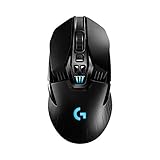
Logitech G903 LIGHTSPEED HERO
The Best Wireless Mouse Money Can Buy

Wireless mice have a tendency to be less responsive and have latency compared to wired mice, but in the case of Logitech G903 LIGHTSPEED, these issues seem to be non-existent. Reason for that lies in the implementation of the Hero 16K sensor and the 2.4GHz Lightspeed wireless connectivity that have transformed this mouse into a one of a kind device.
Logitech G903 is ergonomic, small and super light (110g). It offers premium performance and great sensitivity of up to 16000dpi. Also, thanks to its Logitech Gaming Software, various customization options are available, among other changing of the RGB light or button functions for example.
Unfortunately, hand to hand with its great features also comes its price that is ridiculously high. This is especially noticeable if you want to use all of its functions, including the Powerplay wireless charging, which demands the purchase of a special charging mouse pad that raises the cost to a level which equals the cost of a budget PC.
Altogether, Logitech G903 LIGHTSPEED is an extraordinary product that will please even the most demanding gamers, but its price tag is just too of an issue. In other words, unless the money isn’t a problem or you just need to have the best of the best, this mouse is simply an overkill in terms of cost and cheaper mice seem as a much better option.
- Numerous customization options
- Solid build
- Highly accurate
- Expensive
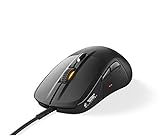
SteelSeries Rival 710
A Beast that Waits To Be Released

Finding the product with a ton of features, great comfort and exceptional performance at a fair price is never easy. Luckily, such devices do exist and one of them is a SteelSeries Rival 710 gaming mouse.
Sleek, with numerous premium features such as split-trigger mechanical switches, OLED screen (for game stats), swappable parts and a lot more, this mouse is a perfect choice for any die-hard gamer.
Its simplicity of use and comfortability which allows for continuous long hours of work or gaming, along with its great sensitivity (up to 12000cpi) thanks to the TrueMove3 optical sensor, makes this device an unmatchable eSports option on the market.
Another thing that increases its gaming value is tactile feedback, which isn’t supported by many games, but still presents an excellent addition to overall gaming and brings a little bit of gamepad experience into the world of gaming mice.
Overall, SteelSeries Rival 710 is almost a perfect product, with the right amount of buttons and customization options that along with its amazing features make its use very smooth and fluid, resulting in the product that every gamer would wish for.
- Smooth
- Responsive
- Not that many games that support its tactile feedback
Corsair Nightsword RGB
A Super-Efficient Gaming Power Tool

Corsair Nightsword RGB is a gaming mouse that combines exceptional design, great performance and an unlimited list of features into a gaming super-machine that delivers everything that die-hard gamers might need.
It offers a futuristic design, with eight customizable RGB lighting parts organized into four areas, sturdy construction and an exceptional build quality that delivers both good durability and comfortability of use.
This gaming mouse is equipped with 10 programmable buttons and a very precise 18000dpi PixArt PMW3391 optical sensor that allows for fine-tuning, even by just a 1dpi at the time.
Corsair Nightsword RGB comes with a braided USB cable and is fitted with sets of weights that are positioned at six different locations and allow for about 120 weight and balance configurations. Thanks to Corsairs iCUE software you are able to control a vast number of functions, including lights and button functions, create numerous game profiles, tune them to different surfaces and a lot more.
Overall, this mouse has it all, including a high price tag that is basically its only real flaw. In other words, for less money, you can get yourself a Logitech G502 that offers similar performance and attractive looks. However, if you want a mouse with plenty of tuning options that will perfectly suit your gaming style, Corsair Nightsword RGB is the best gaming mouse there is.
- Very comfortable
- Excellent build quality
- Great optical sensor
- Solid performance
- A bit pricey
Razer DeathAdder v2
Simplicity and Great Performance in One

If you are seeking a gaming mouse that, before anything else, shines at the fundamentals and allows for a highly comfortable, long-hour use, Razer DeathAdder v2 is the perfect choice for you.
This gaming mouse delivers a highly versatile shape, which makes it suitable for a variety of hand sizes and grips. Also, it is fully compatible with Razer Synapse 3 software that allows for the easy reconfiguration of its eight programmable buttons and the creation of up to five profiles. On top of that, it is fitted with two Chroma RGB Lighting LED zones that present a nice addition to this, otherwise pretty basic, gaming mouse.
More importantly, Razer DeathAdder v2 is equipped with top of the line, Razer’s Focus Plus 20,000 DPI optical sensor that delivers flawless tracking and is the main reason for this mouse’s outstanding MMO and FPS performance, while its simple button assortment makes it easy and fast to master and overall, rather practical to use.
All in all, if you are after a gaming mouse that will deliver superb performance and a great user experience, worth the best gaming mice, Razer DeathAdder v2 is definitely the choice for you.
- Great optical sensor
- It supports a variety of hand sizes
- Easy customization
- Very good performance
- Simple to use
- Buttons are a bit flimsy
Corsair Scimitar RGB Elite
The Perfect MMO Mouse

Corsair Scimitar RGB Elite is a well-built and highly durable gaming mouse that brings nothing less than an excellent gaming performance. It is fast; it has a low 12ms click latency and it offers great comfort, thanks to the soft-touch plastic body. Additionally, it comes with 17 programmable buttons, 12 of which are located on its left side, and it is fitted with a Patented Key Slider control that allows easy repositioning, as well as USB-A connectivity.
Moreover, it is available in black, and black/yellow color and comes equipped with four-zone RGB lighting that makes it a pretty attractive piece of equipment. More importantly, Corsair Scimitar RGB Elite is fitted with PixArt PMW3391 16000 DPI optical sensor, with the 1DPI resolution step adjustability and excellent precision that make it one of the best gaming mice available.
In addition, this mouse also has three predefined profiles; it is compatible with both Windows and iOS, and is an ideal fit for MMO and MOBA gaming, due to its high number of buttons and customization options.
Corsair Scimitar RGB Elite is fitted with mechanical Omron switches that bring great longevity and allow for around 50 million clicks. It also is of a reasonable size that allows its use by users of all hand sizes.
In other words, it has everything needed for a solid gaming experience, especially if you are into the MMO titles.
- Very good click latency
- Durable
- Comfortable
- 17 programmable keys
- Omron switches
- Very good optical sensor
- 12-button side panel
- A bit stiff cable
- Loud
Logitech G PRO X
Excellence with a High Price Tag

Logitech G PRO X is a practical gaming mouse, fitted with an exceptional HERO 25K optical sensor, with a 25600 DPI sensitivity that brings a precise, and fast performance. This mouse has excellent build quality and comes with a matte plastic chassis that provides comfortable use; however, not so great support.
More importantly, Logitech G PRO X features a lightweight 63 grams build, and offers both USB wired and RF wireless connectivity. In addition, it is compatible with both Mac and Windows and comes fitted with five buttons that are fully customizable over the well-established G Hub app. Moreover, it is available in black and white color, and it comes with a reasonable, yet not impressive two-year warranty.
Logitech G PRO X offers great versatility and can be used for a whole bunch of different tasks with the same success, while its great performance and reliability make it suitable for a variety of gaming genres. On top of that, this mouse supports wireless charging (it requires the Powerplay mousepad) and provides super smooth gliding, due to the very good PTFE feet, as well as the additional PTFE surface underneath, which reduces friction.
In other words, Logitech G PRO X is a very good mouse, with both great performance and a great versatility; therefore, if those are your priorities when buying the mouse, this one should be among your top picks.
- 25K HERO sensor
- Lightweight
- Additional PTFE area underneath, for better sliding
- Smooth performance
- Pricey
- No RGB lighting
- Not the best support
SteelSeries Rival 600
An Affordable All-around Mouse that You Will Adore

All-purpose gaming mice are becoming a rarity these days and stumbling upon them from time to time has become a real revelation. One of those discoveries is a SteelSeries Rival 600 that represents everything you would expect from a device of that type. It offers great performance and precision, affordable price, and on top of that, a nice design.
SteelSeries Rival 600 maybe isn’t the best device of this type, but is surely in line with the best, which comes as a result of the great features included, such as the DPI adjuster, TrueMove 3 optic sensor with sensitivity of up to 12000cpi, dual sensor for elimination of lifting and drifting, and a lot more.
This mouse offers an opportunity for various customizations, which includes full control over the eight RBG LED lighting zones, seven programmable buttons, and even tuning of the already mentioned dual sensor.
Very beautiful, with a quality grip and superb performance, this mouse would be the ultimate all-in-one device if there wasn’t a problem with its sometimes-tricky software. This way, SteelSeries Rival 600 presents a great choice that won’t disappoint you, but with a few downsides that might ruin the whole experience a bit.
- Superb design
- Great illumination
- Exceptional sensor
- The software isn’t great
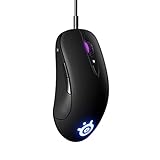
SteelSeries Sensei Ten
A Great-Performing Gaming Mouse in a Sleek Package

Things don’t have to be complicated in order to be good, and the SteelSeries Sensei Ten gaming mouse is the proof of that. To begin with, this mouse offers great comfortability and ease of use, due to soft-touch finish and responsive, easy-to-reach buttons. Also, it provides ambidextrous design and the same assortment of buttons from both sides, which makes it perfect for both lefties and right-handed users.
However, what is more important, due to the 18,000 DPI TrueMove Pro sensor and 50G acceleration, its performance is top of the class, which makes this mouse an exceptional option for any sort of gaming, from strategies to FPS shootouts.
Other cool things about this mouse are its mechanical switches, as well as excellent-quality SteelSeries Engine 3 software that allows for any sort of adjustment, including programming of its two RGB lighting zones and eight programmable buttons, and even the mouse wheel.
In other words, with SteelSeries Sensei Ten you are getting the whole package, as it should be the case with one of the best gaming mice out there.
- Ambidextrous design
- It provides onboard profile customization
- Excellent sensor
- Smooth
- Comfortable
- Elegant-looking
- Good latency
- Its cable isn’t braided
- Not too many features
Razer Naga Pro
An MMO Daydream

Razer Naga Pro is a high-quality gaming mouse, with low-latency performance, and 19 programmable buttons that offer a great level of customization, which makes it an ideal option for MMO gaming. In addition, this mouse features the fully customizable Chroma RGB lighting and has an excellent build quality that includes only the premium components.
For example, there is the Focus+ 20K DPI Optical Sensor, with on-the-fly sensitivity change capability, as well as the Razer optical mouse switches, with light beam actuation that brings blazing fast performance. Moreover, this mouse features a fully modular build and comes with three hot-swappable side panels, with two, six, or 12 buttons allowing for the easy finding of the perfect configuration.
Razer Naga Pro brings great connectivity and can be used over the Bluetooth connection, with the help of the Wireless connection, as well as in the wired USB mode, when its latency is the lowest – only 4ms. Furthermore, this mouse offers a lightweight build of around 152 grams; it provides a decent 100-hour battery life and great comfort, much needed for dedicated gamers.
When talking about the performance, you should know that this mouse delivers smooth performance and a smooth gliding experience, making it a solid option, not only for gaming, but for other tasks as well.
In short, Razer Naga Pro offers just the right combination of features and good quality performance, as it should be the situation with one of the best gaming mice out there.
- Comfortable
- 19 programmable buttons
- Low click latency
- 12-button side panel
- Quiet
- There is no infinite scrolling
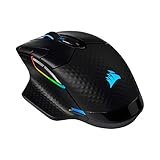
Corsair Dark Core RGB Pro SE
A Feature-Rich, High-Performing Gaming Mouse

Corsair Dark Core RGB Pro SE is a comfortable, low-power consuming gaming mouse, with very low latency levels and overall reliable performance that altogether makes it suitable for both gaming enthusiasts and casual gamers.
This is a feature-rich mouse that offers USB-C and Qi wireless charging and provides Bluetooth, 2.4GHz wireless, and wired USB connectivity. Moreover, there are also nine fully customizable RGB lighting zones, as well as the 50-hour lasting battery that guarantees for more than a solid autonomy.
Furthermore, Corsair Dark Core RGB Pro SE is fitted with an exceptional 18,000 DPI PixArt PAW3392 optical sensor that provides very fast, one ms performance and allows for precise customization that can be managed even in 1 DPI steps and it provides Hyper-Polling Technology that allows for super-fast communication between the mouse and the PC, that can rise up to the impressive 2000Hz.
All in all, if you are after one of the best gaming mice out there, that will make a blasting performance and raise your gaming to another level, Corsair Dark Core RGB Pro SE is definitely a great choice.
- Comfortable
- Robust software
- Low latency
- Fast performance
- Very good customization options
- Pricey
- Not that great for claw grip gamers
HyperX Pulsefire Surge
A Mouse One Step Away from Being Superb

HyperX has a tradition of producing very innovative and refined products that stand out from the rest of the crowd. Sadly, that is not entirely the case with the HyperX Pulsefire Surge that comes with some great features, but still lacks a bit of that special touch that was a characteristic of the previous HyperX mice. That doesn’t mean this mouse is bad, but that it needs just a bit more to be amazing.
Its excellent features, among others, include a super-precise Pixart 3389 sensor with 16000dpi sensitivity, highly reliable Omron switches, and on top of everything else, a dynamic 360-degree RGB lighting that is a story for itself. 32 lighting zones that produce rich and bright light, with a possibility for full customization with the help of the HyperX NGenuity software are the primary characteristics of this cool-looking feature. Unfortunately, the software itself is kinda buggy and pretty much ruins the whole impression about the otherwise superb lighting.
HyperX Pulsefire Surge has a great build quality, comes with a braided cord and six quality buttons that guarantee for its longevity, but still has a few flaws here and there, such as a not-that-great positioning of the buttons.
Overall, HyperX Pulsefire Surge is a good mouse that needs a bit more finishing in order to become excellent.
- Tremendous lighting
- Excellent performance
- Comfortability
- Problematic software
Logitech G502 HERO
A Gaming Mouse that Grows with Time

Keeping the same design for six years and still staying at the top is something very hard to accomplish, but Logitech G502 HERO proves it is possible. This device has gone through a couple of upgrades since its arrival, which includes the implementation of a better-quality sensor and RGB lighting, but its outside is still absolutely the same. More importantly, its performance and attractiveness to customers are still excellent, as it was at the beginning.
Logitech G502 HERO comes with a great HERO optical sensor (sensitivity goes up to 16000dpi), 11 customizable buttons, programmable RGB lighting and a lot more.
The device itself is very solid and comfortable for use, but a bit larger and heavier than other similar-type devices, which is surely welcomed by the gamers with larger hands.
Although some might say its design is a bit outdated, it is still attractive enough to compete with the best of the class and fully in accordance with its superb, top-notch performance. Overall, if you want a timelessly-designed gaming mouse that will blow you away with its performance, Logitech G502 HERO is the device to buy.
- Excellent performance
- Comfortability
- A bit heavy
- No wireless function
Razer Basilisk V3
One of the Best out There

If you are seeking a reasonably priced and well-balanced gaming mouse that offers great performance and versatility in one, Razer Basilisk V3 is the device for you. To clarify, this is a mouse that comes with the great Razer Focus + 26K DPI Optical Sensor and features Gen 2 Razer Optical Mouse Switches. On top of that, there is the exceptional Razer Chroma RGB lighting, with its 11 lighting zones, nine of which are located on the base of the mouse, creating a highly attractive, spaceship effect.
In addition, there are also 11 programmable buttons (among others, a multi-function trigger) that are fully customizable through the Razer Synapse software, and the 4-way HyperScroll wheel that offers free spin movement.
Razer Basilisk V3 features an ergonomic design that makes it very comfortable to use, and has a lightweight 101 grams build. It is fitted with 100% PTFE feet for smooth gliding, and above all, it offers an actuation speed of only 0.2 ms, which is neck and neck with the best gaming mice available.
All in all, Razer Basilisk V3 is a well-built, high-performing mouse, with plenty of features that make it attractive for a variety of users and purposes. For that reason, if you need such a mouse, you may be more than sure that Razer Basilisk V3 will fulfill your every request.
- Reasonably priced
- Excellent sensor
- Ergonomic design
- Comfortable
- Very good RGB lighting
- Inventive scroll wheel
- No wireless connectivity
Razer Viper 8KHz
A Lightweight, Fast Tracking Gaming Mouse

Razer Viper 8KHz is a comfortable, ambidextrous gaming mouse that offers excellent tracking capabilities and fast movement, due to the 8000Hz polling rate. This is a lightweight mouse (it weighs 71 grams), fitted with a very good Razer Focus+ 20K Optical Sensor, with a handful of useful features such as Smart Tracking, Asymmetric Cut-Off, and Motion Sync. Moreover, there are also eight programmable buttons, discrete RGB lighting, as well as onboard memory for storing up to five profiles.
Razer Viper 8KHz comes fitted with Gen 2 Razer Optical switches and has a low click latency that makes it suitable for all sorts of fast-paced games. In addition, this mouse is also equipped with the DPI Stage/Change button, a bit disappointingly located at the bottom side of the mouse, and a Razer Speedflex Cable that offers much-needed durability.
From the design standpoint, Razer Viper 8KHz looks just like the regular Razer Viper; however, it offers much better sliding, as well as a strong grip, due to the rubber material on the sides. This mouse is suitable for all hand sizes and it offers exactly what the best gaming mice should. It is fast, comfortable, and brings excellent value that makes it more than suitable most users.
- Well-built
- Lightweight
- 8000Hz polling rate
- Low click latency
- Comfortable
- Ambidextrous
- No wireless connectivity
- Software isn’t compatible with macOS
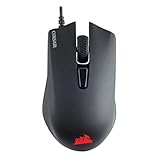
Corsair Harpoon
One of the Best Budget Mice on the Market

Finding a cheap, but a quality device is a goal for most users. Those kinds of devices are not easy to find, but they do exist, and one of them is a CORSAIR Harpoon gaming mouse.
This device isn’t spectacular, but it delivers everything that is needed for a quality performance. It features a decent optical sensor with a sensitivity of up to 12000dpi, six programmable buttons, DPI switcher, comfortability, easy to use CUE software that allows for various customizations (RGB, macros, buttons, etc.) and a lot more.
Of course, because of the cost, some of the features lack the refinement of the pricier rivals, but altogether, CORSAIR Harpoon delivers a great value for the money, well above what the price suggests. No, you won’t get the sensitivity or precision of the top-end devices or a ton of RGB lighting, but still what you get is much more than expected.
For this price, CORSAIR Harpoon is an amazing device that will drastically help you with your gaming and not demand a huge investment at the same time. It’s simply a great deal.
- Excellent value for the money
- Light
- Great price
- No braided cable
- A bit small
Razer Mamba Wireless
A Great All-Around Wireless Mouse That Shines Where It Matters

Razer Mamba Wireless doesn’t bring an innovative design or top-of-the chart performance, yet its altogether value, which includes excellent comfortability, great sensor (sensitivity of up to 16000dpi) and lightweight construction, along with a fair price, is what it makes it so appealing.
Luckily, the list of its great features doesn’t end there, and it also includes good battery life, an ergonomic shape, amazing RGB lighting with customizable Chroma profiles, seven programmable buttons that are crisp and responsive, and a lot more. The wireless function works flawlessly along with the optical sensor, which means there will be no worries in those departments.
Razer Mamba Wireless isn’t cheap generally speaking, but compared to the other similar type devices, it is in the more affordable area, which just makes it more attractive, especially considering the fact that this is a premium-quality product.
Overall, if you want a great-performing wireless mouse that will never disappoint you, Razer Mamba Wireless is the device for you.
- Comfortable
- Flawless wireless
- Superb lighting
- Excellent performance
- The software isn’t that great
What to Keep in Mind
Even if you’ve already invested in the best gaming computer and accessories, you’re still going to need the best gaming mouse that’s both high-quality and comfortable if you’re looking for a supreme PC gaming experience.
While choosing a reliable and stylish gaming mouse can make a noticeable difference in your gameplay and overall enjoyment, that doesn’t mean you have to spend a fortune. Luckily, there’s plenty of options for both high-end and budget options, regardless of if you want the best Logitech gaming mouse or a great mouse under 50 dollars.
Whether you’re looking for a high-end gaming mouse to complete your ultimate gaming setup or you just want a cool and comfortable budget mouse that does its job, here are a few things to think about before making your purchase:
Your gaming style. Whether you’re a general gamer or specialize in MMOs, FPS or MOBA games, there’s likely a mouse out there specific to your needs.
Weight, size and shape. Depending on what you prefer, some mice may be more comfortable in your grip than others. Look for smooth mice with palm rests and refined rubber grip coating.
Buttons. The amount of programmable buttons you need depends on what you intend to use the mouse for. This is also true when it comes to button positioning and texture.
Sensor. While optical mice are generally better for gaming, a laser mouse likely won’t disappoint depending on its other features and functionality.
Features and design. If you’re paying for a gaming mouse, you should expect it to have some lighting customization options and color choices. You should also choose a design that attracts you personally.
Once you’ve figured out what you’re looking for while shopping for the best mouse for gaming, take some time to enjoy the browsing experience. There’s plenty of options out there, it’s just a matter of finding a gaming mouse that captures your interests and works for your individual gaming style.

